Secreto: Integrating a Quirky Display Font into Professional Design Workflows
In the landscape of digital design, typography is rarely just about readability; it is about voice. While sans-serif fonts dominate corporate communications and serif fonts anchor long-form editorial content, there exists a niche for typefaces that demand attention through sheer personality. Secreto occupies this space as a street-styled, quirky, and dramatic display font. For designers, marketers, and creative professionals, integrating such a specialized asset requires more than simply dragging it onto a canvas. It demands an understanding of its technical architecture—specifically its PUA encoding—and how it fits into the broader lifecycle of a creative project.
This article explores the practical implementation of Secreto in professional workflows. We will examine how to leverage its unique glyph set for impactful visual communication, manage its compatibility across different software environments, and maintain consistency when using it in branding or campaign materials. The goal is to move beyond aesthetic appreciation and treat Secreto as a functional tool within your design stack.
Understanding the Asset: What Makes Secreto Unique?
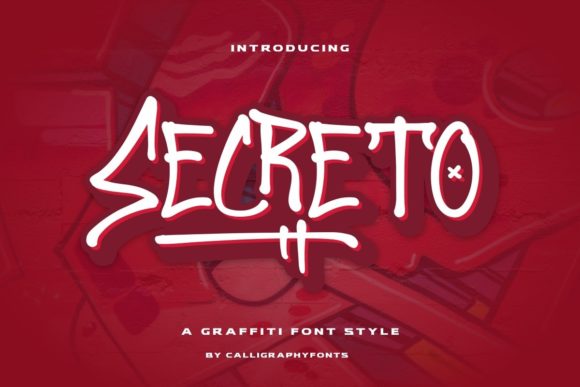
Before discussing integration, one must understand the specific characteristics of the font itself. Secreto is not a body text font. Its design language is rooted in street style, characterized by irregular shapes, dramatic contrasts, and a certain chaotic energy. This makes it ideal for headlines, posters, album covers, and social media graphics where stopping power is the primary objective.
The most critical technical feature for any designer to note is that Secreto is PUA encoded. Private Use Area (PUA) encoding means that the glyphs are mapped to code points reserved for private use, rather than standard Unicode characters. In practical terms, this allows the font creator to include a vast array of alternate characters, ligatures, and decorative elements without conflicting with standard text input methods. However, it also means you cannot simply type these characters out on a keyboard. You must access them through a dedicated interface, typically found within font management software or advanced typographic tools like Adobe Glyph Panel or OpenType features.
This distinction is vital for workflow efficiency. If you attempt to search for "Secreto" in a standard word processor expecting to find all its variations via the keyboard, you will be disappointed. Mastery of the font comes from mastering its access method.
Pre-Production: Planning and Asset Management
Effective design begins before the first pixel is placed. When incorporating a complex font like Secreto into a project, preparation is key to avoiding technical hurdles later in the pipeline.
Font Installation and Verification
The first step in any new project involving Secreto is ensuring the font file is correctly installed and recognized by your operating system. Because it is a display font with many alternates, verify that the installation includes the full family weight if available. Check the font metadata in your system settings to ensure no corruption occurred during download. A broken font file can lead to missing glyphs mid-project, causing significant delays.
Defining the Visual Hierarchy
Due to its dramatic nature, Secreto should never compete with body copy. In your initial planning phase, define clear roles for the typeface. Use Secreto for:
- Primary Headlines: Where immediate impact is required.
- Call-to-Action Buttons: To draw the eye to conversion points.
- Thematic Elements: Such as dates, locations, or decorative dividers.
Conversely, reserve neutral, highly legible fonts for paragraphs and detailed information. This contrast ensures that the quirkiness of Secreto enhances the design rather than overwhelming it. Documenting this hierarchy in your style guide or project brief helps maintain consistency, especially when working with teams.
Implementation: Workflow Integration During Creation
Once the project is underway, the focus shifts to execution. How do you efficiently use the PUA-encoded glyphs without slowing down your creative process?
Leveraging Font Management Software
Relying on your operating system’s default font picker is inefficient for fonts with extensive alternate sets. Invest time in learning a robust font management application (such as Suitcase Fusion, FontBase, or Adobe Fonts). These tools often provide a preview window that displays all available glyphs and ligatures for the selected font.
When designing in vector software like Illustrator or InDesign, open the Glyphs panel. Search for "Secreto" and browse the available alternatives. Dragging and dropping specific glyphs directly onto your artboard is significantly faster than trying to memorize keyboard shortcuts for PUA characters. This method allows you to experiment with different ligatures and stylistic sets rapidly, helping you find the perfect combination for your headline.
Handling Compatibility Across Platforms
A common pitfall in digital design is assuming that a viewer has the same font installed. Since Secreto is a specialized display font, it may not be pre-installed on client machines or mobile devices. To mitigate this:
- For Print Projects: Ensure the font is embedded in PDF exports. Use high-resolution outlines for critical logos or standalone text elements to guarantee they render exactly as intended, regardless of the printer’s system.
- For Web Projects: Do not rely on web fonts for Secreto unless it is hosted on a reliable CDN with proper licensing. Instead, consider converting key headlines to SVG paths. This flattens the text into vector shapes, ensuring the quirky details remain intact across all browsers and devices. Alternatively, use CSS @font-face rules carefully, but always have a fallback sans-serif font defined for accessibility and performance.
Collaboration and Handoff
If you are handing off files to developers or other designers, clarity is essential. Include a note in your delivery package specifying that Secreto is used and providing the font file itself. Highlight which specific glyphs were used for key elements. This prevents collaborators from accidentally replacing the font with a similar-looking alternative, which could ruin the intended dramatic effect.
Quality Control and Long-Term Consistency
Maintaining the integrity of a brand or project over time requires strict quality control measures, particularly when using unconventional typefaces.
Accessibility Considerations
While Secreto is visually striking, its irregular shapes can pose challenges for users with dyslexia or visual impairments. As part of your review process, evaluate the contrast between the text and background. Ensure that the size of the text is large enough to compensate for any irregularities in letterforms. Never sacrifice legibility for style in functional areas of a design, such as navigation menus or error messages.
Version Control
Fonts evolve. If you are using a free version of Secreto, be aware that updates might change the glyph mappings. Keep a record of the exact version number you used for each project. If a future update alters the appearance of a critical ligature, knowing the original version allows you to revert or adjust accordingly. For commercial projects, consider purchasing a license that includes version locking or priority support for font issues.
Expanding Creative Possibilities
Secreto’s strength lies in its ability to inject character into otherwise sterile layouts. Think about how it can interact with other assets. Pairing Secreto with gritty textures, halftone patterns, or bold geometric shapes can amplify its street-style aesthetic. Conversely, placing it against a clean, minimalist white background creates a powerful juxtaposition that highlights its quirks.
Consider using the PUA-encoded extras not just as letters, but as graphical elements. Some glyphs in display fonts function better as icons or decorative borders than as alphabetic characters. Experiment with scaling these elements up or down, rotating them, or layering them behind images to create depth. This approach treats the font as a library of graphic resources rather than just a text tool.
Conclusion
Integrating Secreto into your design workflow is about balancing artistic expression with technical precision. By understanding its PUA encoding, preparing your assets properly, and maintaining strict quality control, you can harness its dramatic potential without encountering frustrating roadblocks. Whether you are creating a poster, a website header, or a brand identity, Secreto offers a distinctive voice that, when used correctly, can elevate your work from ordinary to unforgettable. Treat it as a specialized instrument in your toolkit, and let its unique character drive your creative outcomes.