Scary Hours: Integrating a Spooky Display Font into Professional and Creative Workflows
Typography is rarely just about readability; it is a primary vehicle for tone, atmosphere, and immediate emotional response. For designers, marketers, and content creators, selecting the right typeface is a critical decision that can make or break a project’s aesthetic cohesion. Enter Scary Hours, a unique display font designed specifically to evoke a sense of unease, mystery, and Halloween-themed intrigue. While its name suggests a seasonal novelty, its utility extends far beyond October 31st. When integrated correctly into a broader design workflow, Scary Hours offers a powerful tool for brands, hobbyists, and professionals looking to inject a distinct, edgy personality into their visual communications.
Understanding the Asset: What Is Scary Hours?
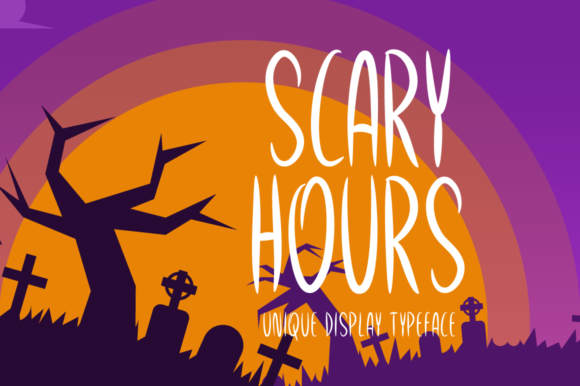
Before diving into implementation, it is essential to understand the asset itself. Scary Hours is not a body text font. It is a display typeface, meaning it is engineered for impact at larger sizes rather than legibility in dense paragraphs. The characters are crafted with jagged edges, irregular spacing, and a distressed texture that mimics the feeling of decay, shadows, or supernatural presence. This specific character set makes it an ideal candidate for headlines, posters, social media graphics, and packaging where the goal is to grab attention instantly.
The font’s versatility lies in its thematic specificity. It fits seamlessly into any Halloween-related project, from digital invitations to physical craft projects. However, its appeal also resonates with horror enthusiasts, escape room organizers, and gaming communities who appreciate dark aesthetics year-round. By recognizing Scary Hours as a specialized tool rather than a general-purpose font, users can better plan its deployment within their creative processes.
Pre-Production: Planning and Compatibility Checks
Effective workflow management begins before the first pixel is placed. When incorporating a niche font like Scary Hours into a professional project, preparation is key. The first step in this phase is verifying technical compatibility. Ensure that your design software (such as Adobe Illustrator, Photoshop, Canva, or Affinity Designer) supports the font format provided, typically .OTF or .TTF. If you are working in a collaborative environment, confirm that all team members have access to the font files to prevent substitution errors during the rendering process.
Nested within this planning stage is the consideration of licensing. Whether you are a freelancer, a small business owner, or an educator, understanding the usage rights of Scary Hours is crucial. Determine if the license covers commercial use, web embedding, or print runs. Proper documentation of these terms prevents legal complications later in the project lifecycle. Additionally, create a dedicated folder structure for your assets. Storing the font file alongside your project mockups ensures that resources are organized and easily retrievable, maintaining efficiency throughout the production timeline.
Integration in Design Workflows
Once the preparatory steps are complete, the integration of Scary Hours into the actual design process requires strategic placement. Because the font has a heavy visual weight, it should be used sparingly. Overuse can lead to visual fatigue and reduce the overall quality of the piece. Instead, treat Scary Hours as an accent element that draws the eye to specific information.
Headline Hierarchy and Contrast
In a typical layout, hierarchy guides the viewer’s eye. Use Scary Hours for the primary headline to establish the theme immediately. To ensure readability and balance, pair it with a clean, neutral sans-serif or serif font for subheadings and body text. This contrast highlights the spooky nature of the display font while maintaining necessary clarity. For example, in a marketing email campaign for a Halloween sale, the subject line might feature Scary Hours to increase open rates through curiosity, while the rest of the email uses standard fonts for easy scanning.
Digital and Print Consistency
Maintaining consistency across platforms is a common challenge in modern workflows. When using Scary Hours, test how the font renders on different devices and media. On screens, the distressed details of the letters may appear sharper or blurrier depending on the resolution. In print, consider how the ink will settle on paper; highly detailed fonts can sometimes lose definition if printed at low DPI. Adjusting kerning (the space between individual letters) may be necessary to ensure the intended spooky effect translates accurately from screen to page.
Practical Use Cases Across Industries
The application of Scary Hours varies significantly depending on the industry and the specific goals of the user. Below are several practical scenarios where this font adds tangible value to a project.
- Event Marketing: For pop-up bars, haunted houses, or costume parties, Scary Hours serves as a central branding element. It helps create an immersive atmosphere even before guests arrive. Use it on QR codes linked to ticket purchases or on directional signage to guide attendees through a themed experience.
- E-commerce and Product Packaging: Small business owners selling Halloween costumes, candy, or decor can use this font to differentiate their products on crowded shelves. A limited-edition product label featuring Scary Hours signals exclusivity and thematic relevance, encouraging impulse buys.
- Content Creation and Blogging: Bloggers and YouTubers often struggle to maintain brand identity during seasonal content shifts. Using Scary Hours for temporary banners, thumbnail overlays, or video intros allows creators to participate in trending topics without permanently altering their core brand aesthetic. This modular approach to design allows for flexibility and trend responsiveness.
- Educational Materials: Educators teaching literature related to Gothic themes, horror history, or creative writing can use the font to enhance engagement. Worksheets, certificates, or classroom decorations featuring Scary Hours can make learning more immersive and memorable for students aged 20–50 who are returning to education or pursuing adult hobbies.
Quality Control and Long-Term Maintenance
After the design is finalized, rigorous quality control ensures that the final output meets professional standards. Review the typography at various zoom levels to check for artifacts or unintended gaps in the letterforms. If the font includes ligatures or special characters, verify that they render correctly. For web-based projects, consider converting the font to a web-safe format or using CSS @font-face rules to optimize load times without sacrificing visual integrity.
Long-term use also involves archiving. Fonts are tools that may need to be reused in future campaigns. Save high-resolution versions of your designs along with the original font files. If you are part of a larger organization, contribute Scary Hours to your company’s shared asset library with clear metadata tags such as “Halloween,” “Display,” and “Horror.” This organizational habit reduces friction for other team members who might need the font for similar projects in the future.
Conclusion: Maximizing Creative Potential
Scary Hours is more than just a seasonal novelty; it is a versatile design asset that, when handled with care, can elevate the emotional impact of a wide range of projects. By approaching its integration with a structured workflow—covering preparation, strategic placement, cross-platform testing, and proper archiving—creators can harness its spooky potential effectively. Whether you are a marketer launching a holiday campaign, a designer crafting a portfolio piece, or a hobbyist creating custom crafts, Scary Hours offers a distinctive voice. The only limit is your imagination, but the success of its implementation depends on thoughtful execution and respect for its typographic characteristics.