Turn off the Mic
Design is often about making a statement, and sometimes that statement needs to be loud enough to cut through the noise. If you are looking for a typeface that embodies urban energy, street credibility, and raw texture, Turn off the Mic is a font that demands attention. It is not just another brush script; it is a carefully crafted display font with a distinct personality. Whether you are designing for a music festival, a sportswear brand, or a gritty urban clothing line, this tool can elevate your visual communication.
However, selecting a display font like Turn off the Mic requires more than just clicking "download." There are nuances in usage, licensing, and technical implementation that can make or break your design project. Many creators overlook these details, leading to designs that feel amateurish or technically flawed. This guide explores how to use this font effectively, avoiding common pitfalls while maximizing its impact.
Understanding the Aesthetic of Turn off the Mic
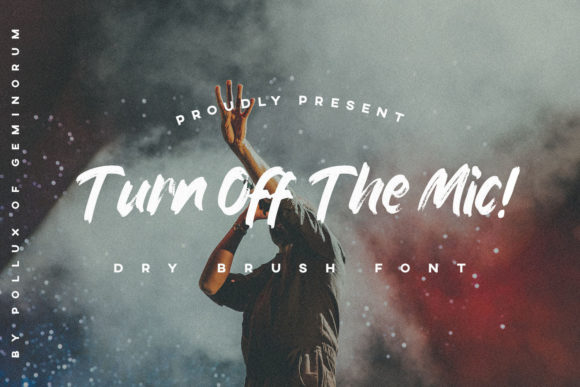
The core appeal of Turn off the Mic lies in its brushed, textured appearance. It mimics the look of paint applied with a wide, dry brush, creating an organic, imperfect feel that resonates with modern urban art trends. This aesthetic is particularly effective in industries where authenticity and edge are valued.
- Sportswear: The dynamic strokes suggest movement and energy, making it ideal for jerseys, sneakers, and athletic branding.
- Clothing Labels: On t-shirts and hoodies, the font adds a tactile quality that feels hand-painted rather than digitally printed.
- Logos and Advertisements: For brands targeting a youthful or rebellious demographic, the font communicates confidence and non-conformity.
When you choose Turn off the Mic, you are choosing a voice that speaks directly to a culture of self-expression. But remember, this font is a display typeface. It is meant to be seen, not read in long paragraphs. Using it for body text will result in a cluttered, hard-to-read layout that frustrates your audience.
The PUA Encoding Advantage
One of the most significant technical features of Turn off the Mic is its PUA (Private Use Area) encoding. For those unfamiliar with typography jargon, this might sound confusing, but it is actually a powerful feature for designers. Standard fonts have a limited set of characters. PUA encoding allows the designer to pack additional glyphs, swashes, ligatures, and decorative elements into slots that do not conflict with standard ASCII characters.
This means you get access to a wider variety of stylistic options without needing multiple font files. You can easily swap out a standard letter for a more elaborate swash variant, adding flair to your headlines. However, this also introduces a specific challenge: compatibility.
Common Mistake: Ignoring Compatibility Issues
A frequent error occurs when designers assume that because a font looks good in their design software, it will work everywhere. Because PUA-encoded fonts use non-standard character codes, they may not render correctly in all web browsers, mobile apps, or older printing systems. If you embed this font on a website using standard CSS @font-face rules without proper fallbacks, some users might see missing characters or default system fonts instead of your intended design.
To avoid this, always test your PUA-encoded assets across different platforms. If you are using the font for print materials, ensure your printer supports the specific glyph mapping. For digital use, consider converting key text elements to outlines or images if cross-platform consistency is critical, though this sacrifices editability.
Strategic Application in Branding
Using Turn off the Mic effectively requires a balance between boldness and readability. Because the font has a heavy visual weight, it can overpower other elements in a composition if used incorrectly. Here is how to integrate it into your projects without causing visual fatigue.
- Pairing with Simplicity: Since Turn off the Mic is visually complex, pair it with clean, sans-serif or minimalist serif fonts for secondary information. Let the brush font handle the headline, and use neutral typography for details like dates, prices, or descriptions.
- White Space is Key: Give the letters room to breathe. The irregular edges of the brush strokes need space to register with the viewer. Crowding the text diminishes the impact of the unique shapes.
- Color Contrast: The texture of the font works best against high-contrast backgrounds. A dark, textured font on a light background, or vice versa, ensures the details remain visible. Avoid low-contrast combinations, such as gray text on a black background, which will cause the brush effects to disappear.
Evaluating Quality Before Purchase
Not all free or paid fonts are created equal. When evaluating Turn off the Mic, or any similar display font, you must look beyond the preview image. A static image can hide kerning issues, inconsistent stroke weights, or awkward spacing between letters.
Check the Kerning: Look closely at pairs of letters that typically cause spacing issues, such as "AV," "To," or "Wa." In a brush font, these interactions are crucial. If the letters collide or leave excessive gaps, the professional finish is lost.
Verify the Glyph Set: Ensure the package includes all the swashes and alternate characters advertised. Some vendors sell stripped-down versions that lack the full creative potential of the font. Reading user reviews or checking sample documents can provide insight into the completeness of the file.
Technical Considerations for Professionals
For freelancers and agencies, efficiency matters. Working with PUA-encoded fonts can slow down workflow if not managed properly. Since you cannot simply type a swash character using your keyboard’s standard mapping, you must rely on a glyph panel or a specialized plugin to insert the correct symbols. Familiarize yourself with your software’s glyph browser before starting a major project. This preparation prevents last-minute scrambling and ensures you utilize the full range of available variations.
Additionally, consider the file format. If you are sending files to a client or a print shop, provide both the editable source file (with the font embedded or linked) and a flattened PDF or high-resolution PNG. This protects your intellectual property while ensuring the recipient sees exactly what you designed, regardless of whether they have the font installed.
Conclusion on Usage
Turn off the Mic is more than just a trendy typeface; it is a strategic tool for communicating urban, energetic, and authentic brand messages. By understanding its technical quirks, such as PUA encoding, and respecting its visual weight, you can create designs that stand out in a crowded market. Avoid the trap of overusing it, respect the pairing principles, and test thoroughly across mediums. When used correctly, this font transforms ordinary layouts into compelling visual stories that resonate with adults aged 20–50 who value style and substance. Take the time to learn its nuances, and it will serve you well in your next creative endeavor.