Hangout: A Bold Display Font for Impactful Design
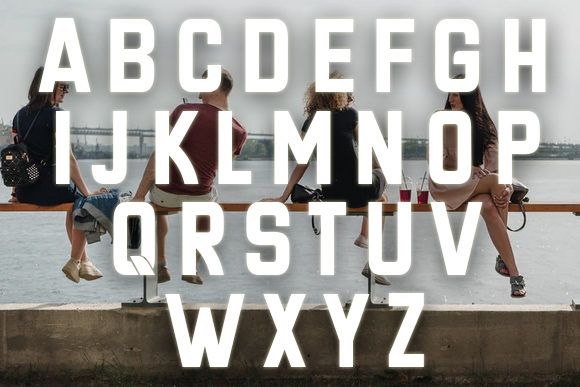
In the world of visual communication, few things are as immediate as typography. Before a viewer reads your headline or scans your body copy, they feel the weight and personality of the typeface. Hangout is not just another sans-serif; it is a bold, sharp-looking display font designed to cut through the noise. It offers a distinct geometric precision that commands attention without sacrificing readability in high-impact contexts.
For designers, marketers, and creators, finding a font that balances aggressive style with professional utility can be a challenge. Hangout solves this by providing a versatile tool that inspires work across various mediums. Whether you are crafting a brand identity, designing a social media campaign, or laying out a digital poster, exploring its endless possibilities allows you to elevate your projects from standard to striking.
Understanding the Hangout Aesthetic
To use Hangout effectively, one must first understand what makes it visually compelling. The font’s defining characteristic is its sharpness. Unlike rounded, friendly sans-serifs that soften a message, Hangout leans into angularity. Its lines are crisp, its corners are defined, and its overall structure feels engineered rather than organic. This gives the text a sense of authority and modernity.
The "bold" nature of Hangout is not merely about stroke weight; it is about presence. When set in large sizes, the letters occupy space with confidence. This makes it an ideal choice for headlines where the goal is to stop the scroll or catch the eye in a crowded physical environment. However, its sharp edges also lend it a technical, almost architectural quality. It works exceptionally well in industries that value precision, such as technology, architecture, fashion, and automotive design.
What makes Hangout particularly interesting is its neutrality within its boldness. Because it lacks decorative flourishes or script-like curves, it remains legible even when styled aggressively. This neutrality allows it to adapt to different tones. It can feel futuristic in a tech context, edgy in a streetwear brand, or authoritative in a corporate report. The font does not dictate the emotion; it amplifies the intent behind the words.
Creative Applications and Use Cases
One of the most common mistakes designers make is using display fonts in places where they do not belong. Hangout is a display font, meaning it is meant to be seen, not skimmed. Here is how different professionals can apply it to achieve specific goals.
- Brand Identity and Logos: For startups or rebrands looking to project strength and innovation, Hangout serves as a powerful foundation. Its geometric consistency ensures that logos remain scalable and recognizable across different sizes. Consider pairing it with minimalist iconography to maintain a clean, modern aesthetic.
- Digital Marketing and Social Media: In the fast-paced world of Instagram or LinkedIn, visuals compete for milliseconds of attention. Using Hangout for overlay text on images or banners creates immediate contrast. Its sharp lines stand out against soft photography or busy backgrounds, ensuring the message is read instantly.
- Event Posters and Flyers: For concerts, conferences, or product launches, energy is key. Hangout’s bold presence adds dynamism to layout designs. Experiment with tight tracking (letter-spacing) to create a dense, impactful block of text, or stretch it horizontally for a cinematic, widescreen feel.
- Editorial and Blog Headers: While body text should remain in a more neutral typeface, Hangout excels at breaking up long-form content. Use it for pull quotes, section headers, or feature titles. It signals to the reader that this part of the content is significant, guiding their eye through the article structure.
Strategic Styling for Maximum Impact
Using Hangout well requires more than just selecting it from a menu. It demands thoughtful styling to ensure the design remains effective and audience-friendly. Here are practical recommendations for working with this typeface.
Contrast is Key
Because Hangout is so dominant, it needs balance. Pairing it with a light, neutral sans-serif or a classic serif for body text creates a harmonious hierarchy. The contrast between the heavy, sharp display font and the delicate, readable body text prevents visual fatigue. For example, a fashion blog might use Hangout for all H2 headers while using a simple Helvetica or Lato for paragraphs. This combination keeps the design fresh without overwhelming the reader.
Experiment with Spacing
Typography is as much about negative space as it is about the letters themselves. With Hangout, adjusting letter-spacing can completely change the mood. Tight spacing creates a unified, solid shape that feels urgent and loud. Wide spacing, conversely, adds elegance and sophistication, allowing each character to breathe. Test both approaches depending on whether you want to convey urgency or refined luxury.
Leverage Color and Texture
Hangout’s sharp angles interact uniquely with color gradients, textures, and overlays. Try applying a gradient fill to the text to add depth, or use a texture like concrete or metal to enhance its industrial feel. Since the font has clean lines, these effects will render sharply without blurring the letterforms. This technique is particularly effective in web design and digital advertising.
Adapting Hangout for Different Audiences
Different users have different needs, and Hangout can be adapted to meet them. Here is how various groups can leverage its versatility.
Freelancers and Agencies: For those pitching to clients, having a strong typographic voice sets you apart. Using Hangout in proposals and presentations demonstrates a keen eye for detail and a commitment to bold design choices. It shows that you understand how typography influences perception.
Educators and Content Creators: If you are creating educational materials, infographics, or YouTube thumbnails, clarity is paramount. Hangout helps highlight key concepts. Use it to emphasize definitions, dates, or important terms. Its readability ensures that learners grasp the core information quickly.
Small Business Owners: Local businesses often struggle to look established. Hangout can give a small brand the visual weight of a larger corporation. Use it on signage, business cards, and packaging to project professionalism and reliability. The sharp, clean lines suggest efficiency and competence.
Best Practices for Consistency and Originality
To keep your results clear and organized, establish a typographic system around Hangout. Do not use it for every heading. Reserve it for primary emphasis. Overusing a bold display font can dilute its impact, making everything look equally important and nothing stand out.
Furthermore, ensure consistency in usage. If you choose a specific weight and style of Hangout for your brand, stick to it. Mixing multiple weights randomly can create visual chaos. Instead, build a palette that includes Hangout alongside complementary fonts and colors. This approach maintains originality while ensuring that your design remains cohesive and professional.
Finally, always test your designs in real-world contexts. How does Hangout look on a mobile screen? Does it hold up when printed on a small label? Display fonts can sometimes lose detail at very small sizes, so be mindful of application limits. By testing early and often, you can refine your approach and avoid costly revisions later.
Conclusion
Hangout is more than a font; it is a design decision that signals confidence. Its bold, sharp appearance makes it an invaluable asset for anyone looking to create memorable, high-impact visuals. By understanding its characteristics and applying it strategically, you can transform ordinary projects into extraordinary experiences. Explore its possibilities, experiment with its styles, and let its unique voice inspire your next creative endeavor.